启动器安装时报错安装程序在写入安装信息时发生了错误。请检查磁盘空间是否足够,并选择“重试”或“取消”结束安装。An error occurred while writing installation information to disk.check to make sure enough disk space is available and dick Retry, or Cancel to end the install.

启动器安装时报错安装程序在写入安装信息时发生了错误。请检查磁盘空间是否足够,并选择“重试”或“取消”结束安装。An error occurred while writing installation information to disk.check to make sure enough d...

本文整理自《群星常见问题合集及解决办法》,原作者:唏嘘南溪。文档内容会随实际反馈持续修正。

1. 报错现象

启动器安装时报错安装程序在写入安装信息时发生了错误。请检查磁盘空间是否足够,并选择“重试”或“取消”结束安装。An error occurred while writing installation information to disk.check to make sure enough disk space is available and dick Retry, or Cancel to end the install.。

2. 解决方法
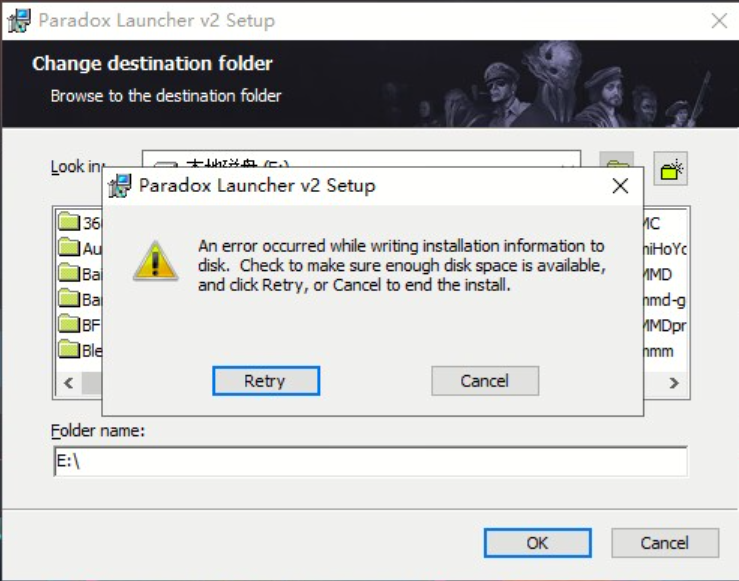
启动器安装时报错安装程序在写入安装信息时发生了错误。请检查磁盘空间是否足够,并选择“重试”或“取消”结束安装。An error occurred while writing installation information to disk.check to make sure enough disk space is available and dick Retry, or Cancel to end the install.相关报错截图 1

该报错在 win7 中较为常见,因缺少设备,样例图片采用网络搜集的图片。

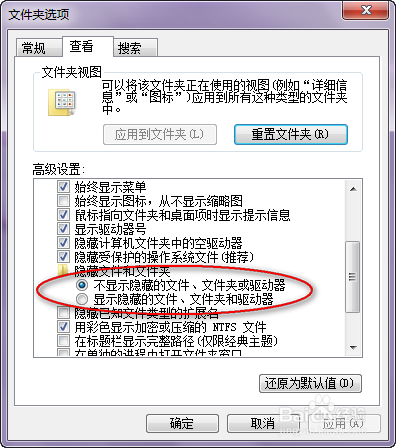
任意打开一个文件夹,在菜单栏找到——工具——文件夹选项——查看——选“显示隐藏的文件、文件夹和驱动器”。
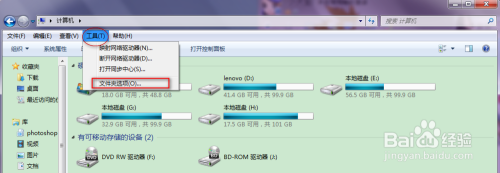
启动器安装时报错安装程序在写入安装信息时发生了错误。请检查磁盘空间是否足够,并选择“重试”或“取消”结束安装。An error occurred while writing installation information to disk.check to make sure enough disk space is available and dick Retry, or Cancel to end the install.相关报错截图 2

启动器安装时报错安装程序在写入安装信息时发生了错误。请检查磁盘空间是否足够,并选择“重试”或“取消”结束安装。An error occurred while writing installation information to disk.check to make sure enough disk space is available and dick Retry, or Cancel to end the install.相关报错截图 3

打开用户临时文件夹所在的文件夹,一般为“C:\Users\XXX\AppData\Local”,其中的 XXX 为你的用户名(依次打开 C 盘,用户名,AppData,Local),就可以找到 Temp 文件夹。
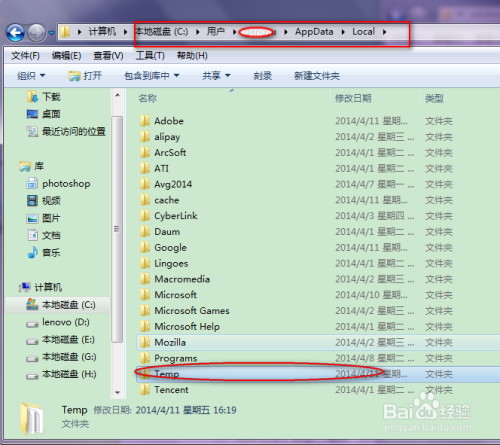
启动器安装时报错安装程序在写入安装信息时发生了错误。请检查磁盘空间是否足够,并选择“重试”或“取消”结束安装。An error occurred while writing installation information to disk.check to make sure enough disk space is available and dick Retry, or Cancel to end the install.相关报错截图 4

右键单击 Temp 文件夹,选“属性”,单击“安全”选项卡,检查“组或用户名”里有没有“Everyone”:
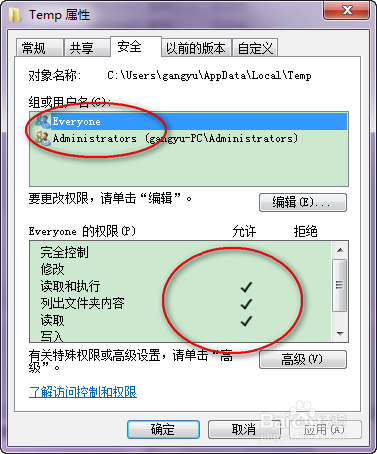
启动器安装时报错安装程序在写入安装信息时发生了错误。请检查磁盘空间是否足够,并选择“重试”或“取消”结束安装。An error occurred while writing installation information to disk.check to make sure enough disk space is available and dick Retry, or Cancel to end the install.相关报错截图 5

如果有“Everyone”,(一般来说这个时候,可以看到下面的好多权限是没有的)单击“编辑”,在新的选项卡窗口选中“Everyone”,在下面的权限窗口中——选中“完全控制”。此时,一般可能会出现“C:\Users\XXX\AppData\Local\Temp\„„拒绝访问”,选“取消”,可能会有一个警告,不用理会,“确定”。这时再检查一下,就可以看到“Everyone”已经有了完全控制的权限。
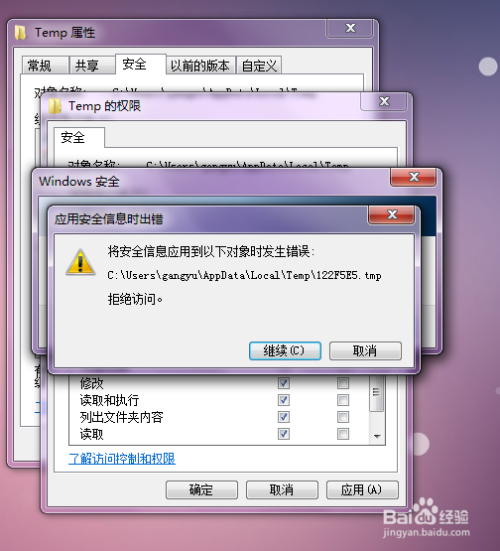
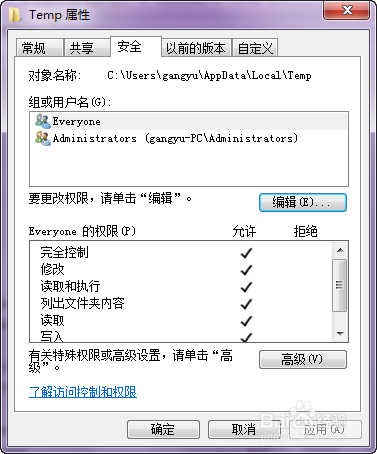
启动器安装时报错安装程序在写入安装信息时发生了错误。请检查磁盘空间是否足够,并选择“重试”或“取消”结束安装。An error occurred while writing installation information to disk.check to make sure enough disk space is available and dick Retry, or Cancel to end the install.相关报错截图 6

启动器安装时报错安装程序在写入安装信息时发生了错误。请检查磁盘空间是否足够,并选择“重试”或“取消”结束安装。An error occurred while writing installation information to disk.check to make sure enough disk space is available and dick Retry, or Cancel to end the install.相关报错截图 7

如果没有“Everyone”,单击“编辑”按钮,在新的选项卡窗口选“添加”,在新窗口中添加“everyone”,单击确定。然后按照上面一个步骤设置即可

3. 仍未解决

如果上述方法不适用,建议记录完整报错文字、复现步骤和 error.log 内容后再进一步排查。也可以联系原文作者(QQ:3217344726)反馈,以便补充或修正方案。

Powered by YSY
使用 Hugo 构建
主题 StackJimmy 设计